Author: Admin

  • Net 30 Payment Terms Explained (With Examples)

    Net 30 Payment Terms Explained (With Examples)

    Learn what “Net 30” means, when to use it, and alternatives for your cash flow.

    What Does “Net 30” Mean?

    Net 30 means the client must pay the full invoice amount within 30 days of the invoice date.

    Example: Invoice Date: January 1 → Due Date: January 31.

    Why Businesses Use Net 30

    • Gives clients more time to pay
    • Builds long-term relationships
    • Improves predictability for B2B deals

    Is Net 30 Right for You?

    Choose Net 30 if you work with reliable clients or recurring services. Avoid it if immediate cash flow is critical or you face late payments.

    Alternatives to Net 30

    • Net 7 – Faster payments
    • Net 15 – Popular for SMBs
    • Net 60 – Common with large enterprises
    • Due on Receipt – Immediate payment

    How to Add Net 30 to Your Invoice

    Payment Terms: Net 30
    Due Date: March 30, 2025

    Set terms clearly and include late fee policies if necessary.

  • Proforma Invoice vs Invoice: What’s the Difference?

    Proforma Invoice vs Invoice: What’s the Difference?

    Understand when to use a proforma invoice and when to issue a final invoice.

    What Is a Proforma Invoice?

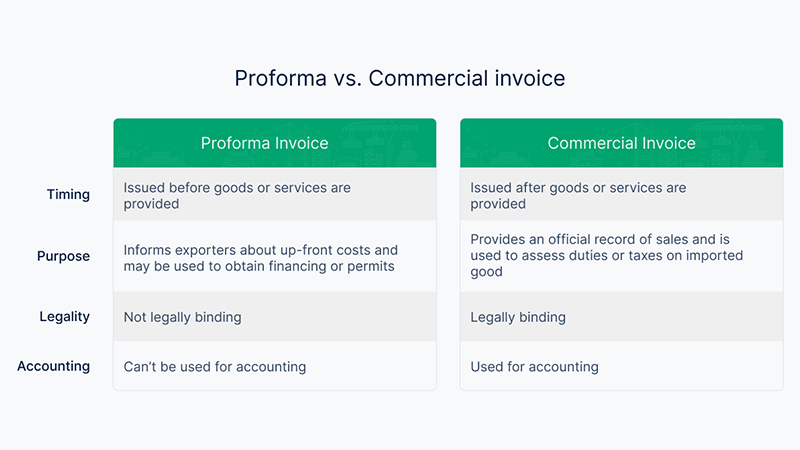
    A proforma invoice is a preliminary document sent before goods or services are delivered. It outlines estimated costs and terms—not a payment request.

    • Used for price quotes and customs
    • Shows estimated amounts
    • Not legally binding
    • Not a request for payment

    What Is an Invoice?

    An invoice is an official request for payment after delivery of goods/services.

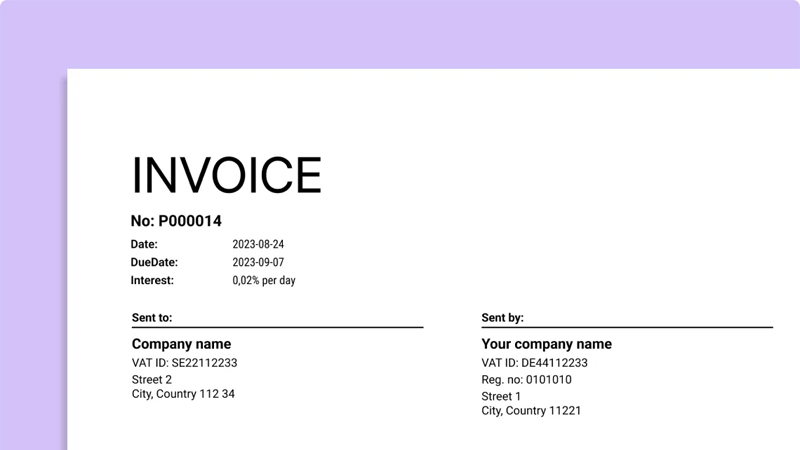
    • Includes invoice number and due date
    • Shows final totals and taxes
    • Legally binding & used for accounting
    • Triggers the payment process

    Key Differences (Quick Table)

    Feature Proforma Invoice Invoice
    Payment Required No Yes
    Legally Binding No Yes
    Amounts Estimated Final
    When Used Before shipping After delivery

    Which One Should You Use?

    Use a Proforma Invoice for quotes and customs; use an Invoice to request payment and record the transaction.

  • How to Create an Invoice Online (Step-by-Step Guide)

    How to Create an Invoice Online (Step-by-Step Guide)

    Create a professional invoice in minutes with this simple walkthrough.

    1) Enter Your Business Details

    • Company or full name
    • Address
    • Email & phone
    • Website (optional)
    • Logo (recommended)

    This information helps clients quickly recognize the sender.

    2) Add Your Client’s Information

    • Name or company name
    • Billing address
    • Contact email/phone

    3) Generate an Invoice Number

    Use a unique, sequential style like INV-001, INV-2025-015, or #1253 to keep records organized.

    4) Add Products or Services

    • Item name
    • Quantity
    • Unit price
    • Line total

    Include VAT/tax, discounts, and notes when needed.

    5) Set Payment Terms

    Common terms: Net 7, Net 15, Net 30, or Due on receipt. Clear deadlines = faster payments.

    6) Download or Share

    Export as PDF or share a secure link with your client.